The meaning and How to use Microsoft Publisher
Microsoft Publisher
What does Microsoft
Publisher mean?
Microsoft Publisher is a graphic design application that is
similar to Microsoft Word but differs in the fact that its emphasis lies more
on page layout and design, and less on word composition and formatting. It
provides easy-to-use and less expensive publishing options for creating designs
and logos for small businesses, where using other high end applications may not
be feasible.

The Page Navigator

Page Navigation shows you thumbnails of all pages in your file. For example, if you had a multi-page newsletter, Page Navigation would show you thumbnails of each page. You can use this to easily navigate from page to page. You can click on a thumbnail to open it in the work space area.
The Status Bar
The status bar is located in the bottom left corner of the MS Publisher 2013 screen and is pictured below. By default, it shows you what page you are viewing and how many total pages exist in your file.
Right click on the Status Bar to set options.
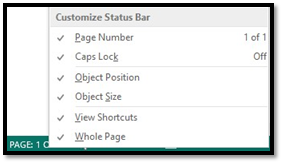
To the right of the page number in the status bar, you'll see these buttons:

These tell you the object location (position) in the publication and the size of the object you have selected.
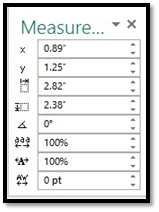
When you click these buttons, you can alter image sizes and locations. You can play with these different options to get a better feel for what they do.
X and Y are the coordinates on the screen where the image or text box appears. Adjusting these will move the image. In addition:
 Adjusts the image width.
 Adjusts the height.
 Adjusts the rotation.
 Adjusts the spacing across a word, line, or column of text. The higher the percentage, the more spacing. This is called tracking.
 Allows you to shrink or stretch the width of the text characters.
 Allows you to adjust the kerning, or the space between two letters.
I hope this article will help you.
Comments
Post a Comment